How do you make TikTok videos with AI?
Pick one format and one niche, then type the topic and angle in one line with the ratio at 9:16. MakeAIVideo writes a hook-first script, records an AI voiceover, builds a scene per beat from stock footage or AI video, times word-by-word captions to the voice and renders a 1080p MP4 in a few minutes. Tweak it in the editor, then post it to your connected TikTok account now or at a time you schedule.
How does the TikTok video generator work?
You type a one-line TikTok idea and MakeAIVideo writes a hook-first TikTok script, records an AI voiceover, generates a scene for each beat, times word-by-word captions to the voice, and renders a 9:16 vertical 1080p MP4 ready to upload to TikTok. A short clip is usually ready in a few minutes.
Is there a free AI TikTok video generator?
You can try it free. Every plan starts with a 7-day free trial with 350 credits, full quality and no watermark; a card is required to start it. After the trial, plans start at $9 a month. The TikTok script generator and TikTok caption generator stay free and need no account.
How much does it cost?
Each TikTok costs credits, all in: script, voiceover, scenes, captions and export. A 30-second stock-footage TikTok is about 112 credits, and a 30-second TikTok in AI scenes with voiceover about 612. Plans start at $9 a month for 600 credits, with a 7-day free trial. Posting every day? Pro is $49 a month for 3,000 credits. Run out? Add credits any time, from $5; credits you buy never expire. See MakeAIVideo plans and pricing.
How much does one TikTok cost?
About 112 credits for a 30-second stock-footage TikTok, with the script, narration and captions included. AI scenes cost more: about 324 credits for 15 seconds and about 612 for 30 seconds with voiceover. The create screen shows the exact cost before you generate, so you always see it first.
How long does a TikTok render take?
Most short vertical clips are ready in a few minutes. Longer videos take longer, and AI-generated scenes take longer than stock footage. The finished TikTok lands in your library when it is done.
What size should an AI TikTok video be?
Vertical 9:16, which MakeAIVideo exports at 1080 x 1920. TikTok lists vertical 9:16 among the basics in its creative best practices. Keep captions and key visuals inside the safe area so the app's buttons and caption do not cover them; MakeAIVideo places its burned-in captions there for you.
What aspect ratios and resolution does it export?
9:16 vertical, the TikTok format, is the default, and the same vertical file works as a Reel or a Short. You can also pick 16:9 landscape or 1:1 square, one ratio per render. Every export is a 1080p MP4 with captions placed in the safe area for the ratio you pick.
Do I need to label AI-generated TikToks?
If the video contains realistic AI images, audio or video, yes: TikTok requires a label, and encourages one on any content completely generated or significantly edited by AI (TikTok: About AI-generated content). Turn on the AI-generated content setting under More options when you post in the TikTok app, or disclose it in the caption when you post from MakeAIVideo. TikTok says the setting won't affect distribution as long as the video follows its Community Guidelines.
Is there a watermark on the videos?
No. Every export is a watermark-free 1080p MP4, yours to upload to TikTok or anywhere else. That holds on every plan and during the free trial.
Can AI TikToks earn from TikTok's Creator Rewards Program?
Videos you generate are yours to use commercially, but TikTok decides what its program pays for. Its Creator Rewards Program rules ask for at least 10,000 followers and 100,000 video views in the last 30 days, videos at least one minute long, and original content; TikTok does not count videos made only of photos or text overlays as original. Make 60 to 90 second TikToks with your own angle and script. See the MakeAIVideo terms.
Can I make faceless TikToks?
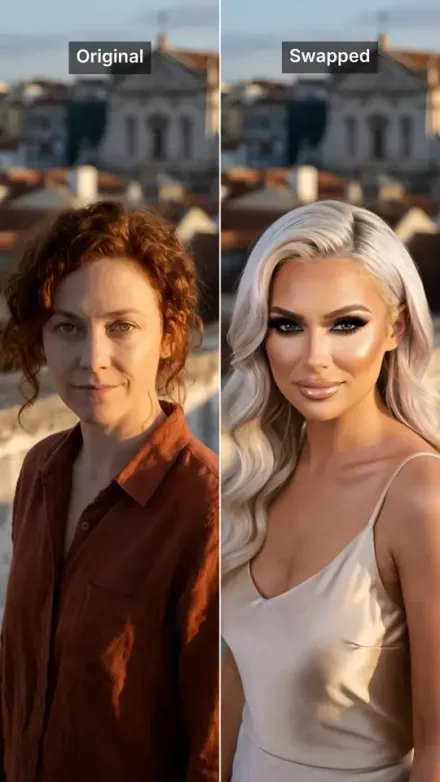
Yes. A narrator over stock footage or AI scenes needs no face at all. For a face that isn't yours, use an AI talking avatar presenter, or film a skit and swap yourself for a character with AI character swap.
Can I edit the TikTok after it generates?
Yes. Open the finished video in the built-in editor to rewrite captions word by word, swap the voice, re-roll a single scene, or restyle the captions. The default export is built to post as-is if you don't want to tweak.
How is this different from a generic AI TikTok generator?
Most TikTok generators hand you a single short AI clip and stop, so you still write the script, record the voice, cut captions, and stitch it elsewhere. MakeAIVideo makes the whole TikTok (script, voiceover, multi-scene visuals, captions, optional music) and outputs the finished vertical video you can post to TikTok directly. For videos that are not TikToks, the AI video generator does the same in any ratio.
Is this an AI short video generator for Reels and Shorts too?
Yes. The same 9:16 render posts to Instagram as a Reel and to YouTube as a Short from the same post dialog. The Instagram Reels generator and YouTube Shorts generator pages cover each platform's own habits.
Can I bring my own TikTok script instead of a one-line idea?
Yes. Script to video narrates your TikTok script word for word over real stock footage or AI scenes, with the same captions and 9:16 export. Give a one-line idea if you want the AI to write the TikTok, or paste the script if you've already written it.
Are captions and music included?
Yes. Word-by-word captions are timed to the voiceover and burned into the export, and background music is optional: pick a track and it ducks under the narration. Nothing to add in post; the clip is ready for the feed.
How long can a generated TikTok be?
Most TikTok-style clips fit 30 to 60 seconds, about 75 to 150 spoken words; a quick tip can be 15 to 30 seconds and a story-driven deep dive 60 to 90. Longer videos are supported (up to 10 minutes for AI-generated scenes), but for the platform the shorter, paced format tends to outperform.
How many AI TikToks should I post?
As many as you can keep up on a steady rhythm. Each video is another chance for TikTok to find your audience, but a pace you drop after a week does less than a smaller one you hold. Make a batch in one sitting and schedule each video for its own slot; scheduled posts go out within about two minutes of the time you set.
Can I cross-post AI TikToks to Reels and Shorts?
Yes. Tick more accounts in the post dialog and the same 9:16 video goes to Instagram as a Reel and to YouTube as a Short, with a caption you can adjust for each platform's limit: 4,000 characters on TikTok, 2,200 on Instagram and 5,000 on YouTube.
What kind of AI voice works best for TikTok?
A conversational, energetic read that matches the niche. Pick a narrator before you generate, re-roll or swap it in the editor if the read is off, and keep the same voice across videos so the account sounds like one creator.
What happens when I run out of credits?
Nothing is lost: your account and finished videos stay exactly as they are. Your plan credits refresh on your next billing date. Run out sooner? Add credits any time, from $5; credits you buy never expire.